Text-to-SVG for GoodNotes
Fast, style-consistent doodles from a prompt, shipped to millions of users.
GoodNotes · Machine Learning Internship · London · Jul to Sep 2025
GoodNotes wanted a feature where a user types a short prompt and gets a clean, hand-drawn doodle they can drop into their notes and keep editing. The doodle has to arrive in a few seconds, look like it belongs in a GoodNotes notebook, and land as editable vector strokes, not a flat raster image.
When I arrived, the version already in production used a strong LLM (Sonnet 3.7) to write SVG code directly from the prompt. It broke in the ways an LLM breaks when you ask it to draw: giraffes with braided necks, birds welded onto bicycles, diagrams with a legend but no matching shapes. Language models are not spatial reasoners. Coordinates written token by token do not add up to a coherent drawing, and no amount of prompt engineering was going to fix that.
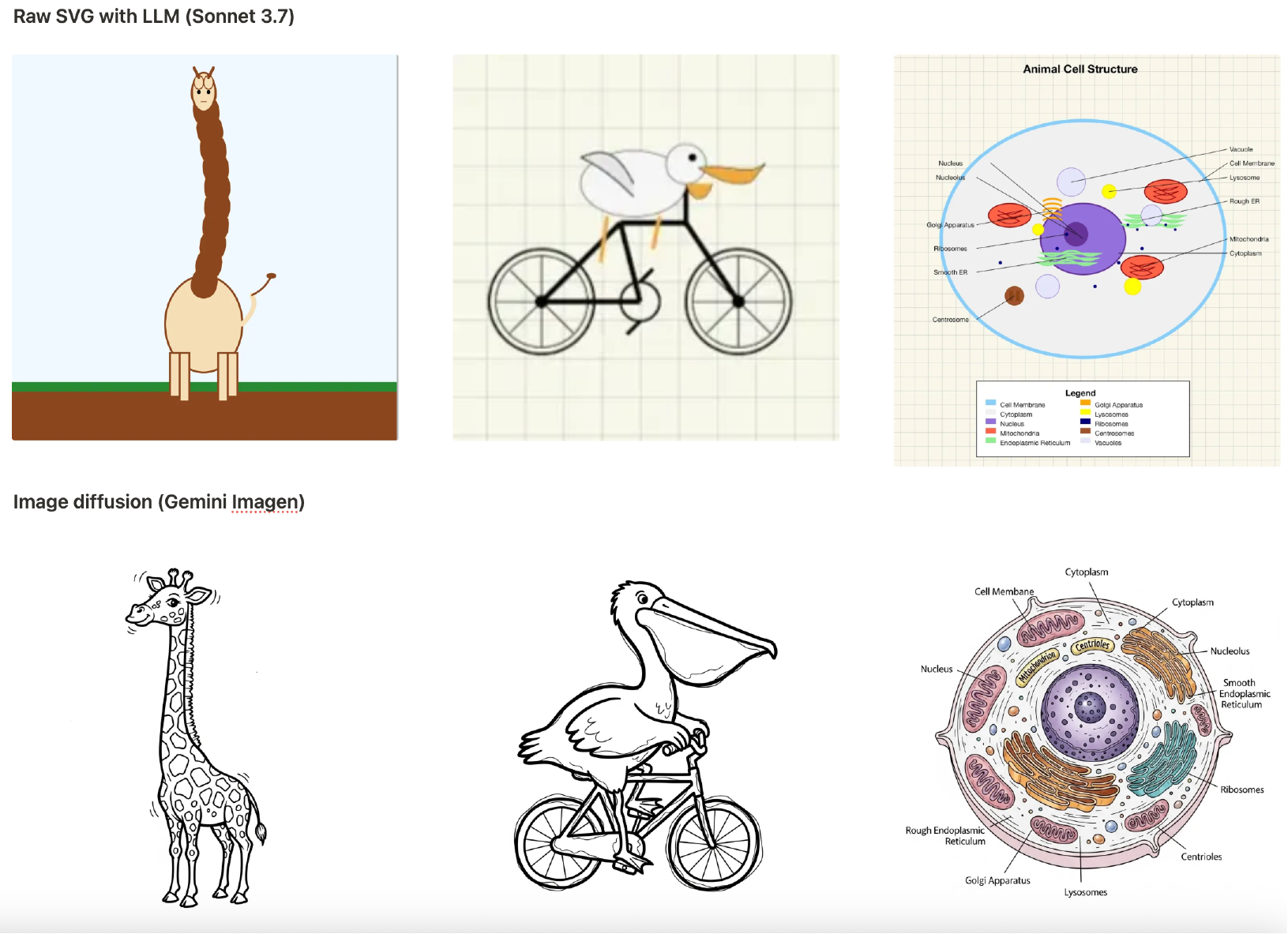
My proposal was to reframe the problem: text-to-SVG is a computer vision task, not a code-generation task. Draw the picture first with a vision model that actually understands shape, then convert it into vector form. I designed and built that pipeline end to end. A diffusion backbone (Gemini Imagen) generates the raster, a style-alignment module I trained on GoodNotes' own doodle aesthetic keeps every output on-brand so it looks like it was drawn inside the app, and a fast vectorization stage converts the rendered image into clean SVG primitives. Those primitives are then mapped to native GoodNotes objects, so users can grab a single stroke and edit it, not delete the whole drawing.
Getting there took real experimentation. I prototyped more than ten variants across the stack (different diffusion backbones, prompt rewriting strategies, candidate filtering and ranking, vectorizers, style-alignment losses) and ran the comparisons that decided which ones stayed. The final pipeline dropped end-to-end latency from roughly 40 seconds to roughly 7 seconds, and moved output quality from "you can tell this is AI" to something users just used. The product team adopted the system and shipped it to the GoodNotes app.